Construction sites move fast. Deadlines tighten, teams shift, and safety risks evolve hourly. Amid all this motion, one simple document keeps safety front of mind: the toolbox talk register. In the UK, where HSE regulations demand documented risk communication, this isn’t just good practice—it’s essential. Yet many site managers still rely on scattered notes, memory, or inconsistent records. A well-structured toolbox talk register template UK bridges that gap, turning ad-hoc conversations into auditable, actionable safety leadership.
This guide delivers a practical, compliant, and field-tested approach to creating and maintaining your register. You’ll find real-world insights, common pitfalls, and a ready-to-use template structure that aligns with UK construction standards.
Why a Toolbox Talk Register Matters in the UK
Toolbox talks are short, focused safety discussions held before work begins. They address immediate hazards—working at height, electrical safety, manual handling, plant operation—tailored to the day’s tasks. But a talk without a record is like a punch without follow-through. The HSE doesn’t require every conversation to be recorded, but if you’re managing risk properly, documentation proves consistency and accountability.
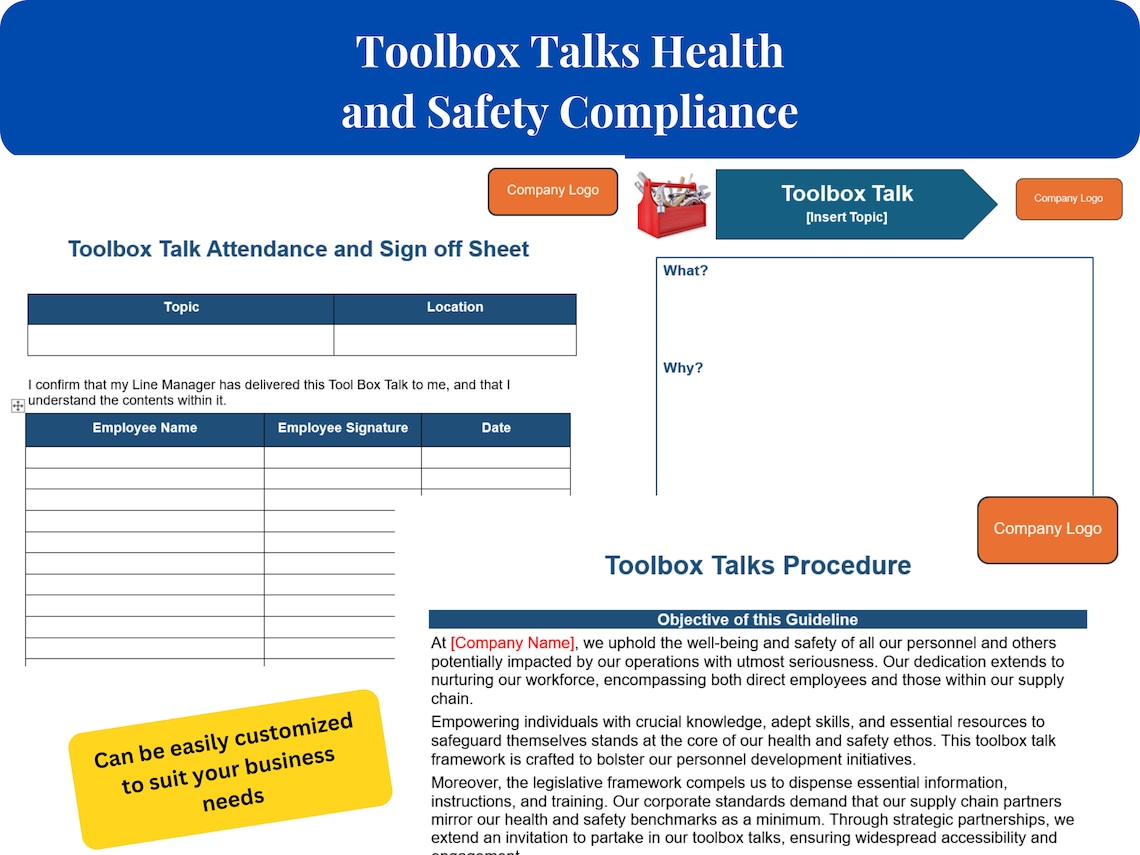
A toolbox talk register is the central log of these discussions. It records: - Date and time - Location or work area - Topic discussed - Trainer or supervisor leading the talk - Attendee signatures - Key actions or controls agreed
In the event of an incident or HSE inspection, this register becomes critical evidence of due diligence. Without it, even the best safety culture can appear negligent on paper.
Core Elements of a UK-Compliant Toolbox Talk Register
Not all templates are equal. A useful register isn’t just a checklist—it’s a living document that supports safety culture. Here’s what every UK-focused toolbox talk register should include:
1. Project and Site Identification Clearly display project name, site address, and contract number. This ensures records can be traced during audits or multi-site operations.
2. Talk Metadata Each entry must capture: - Date and start time - Duration - Work package or activity (e.g., “roof truss installation”) - Weather conditions (if relevant)
3. Safety Topic with HSE Alignment Don’t just write “PPE.” Be specific: “Correct use of fall arrest harnesses during edge work – aligned with Work at Height Regulations 2005.” This shows regulatory awareness.
4. Attendee Tracking Include space for names, roles, and signatures. Use tick boxes for daily crews, but insist on signatures for high-risk topics. Missing signatures are a red flag in inspections.
5. Risk Controls and Actions Document what was agreed: “Ensure harness anchor points inspected before 8am,” or “No unaccompanied access to crane zone.” Assign responsibility and deadlines.
6. Supervisor Verification A final sign-off from the responsible manager ensures oversight and accountability.
Use a digital or printed format—both are acceptable—but ensure backups exist. Digital tools improve accessibility; paper ensures resilience on low-connectivity sites.
Common Mistakes That Undermine Your Register
Even experienced teams fall into traps that weaken the value of their toolbox talk register:
1. Backdating Entries Filling in talks after the fact—especially following an incident—is a major red flag. HSE inspectors can spot inconsistent handwriting, missing weather context, or implausible timing. Real-time documentation is non-negotiable.
2. Generic Topics “General safety” or “Stay safe today” are meaningless. Talks must reflect actual site conditions. Example: Instead of “PPE,” say “High-visibility clothing requirements in low-light tunnel work.”
3. Poor Attendance Tracking Subcontractors often get missed. Use role-based signature lines: “Main contractor,” “Electrical sub,” “Scaffold team.” Rotate who signs if personnel change.
4. No Follow-Up on Actions If a talk identifies damaged ladders, but no repair or removal date is logged, the conversation lacks impact. Use a “review date” column to close the loop.
5. One Size Fits All Template A register designed for office fit-outs won’t serve a civils project. Adapt your template for high-risk activities like confined space entry or hot works.
How to Use the Toolbox Talk Register in Daily Workflow
A register shouldn’t be a chore—it should be part of the rhythm of the site. Here’s how top-performing teams integrate it:
Morning Briefing Integration Hold the toolbox talk during the site start huddle. Record key points immediately after—don’t wait until lunch. Use a laminated wipe-clean version on-site, then transfer to the master register.
Topic Rotation Schedule Plan safety themes monthly. Example: - Week 1: Manual handling - Week 2: Slips, trips, falls - Week 3: Electrical safety - Week 4: Fire awareness
This ensures broad coverage and avoids repetition.
Delegate Ownership Rotate talk leadership among supervisors. It builds competence and engagement. The register tracks who led each session, promoting accountability.
Link to Other Safety Systems Cross-reference with: - Risk assessments (e.g., “See RA-027 for excavation controls”) - Inspection logs (e.g., “Plant check completed at 7:45”) - Incident reports (e.g., “Follow-up to near miss on ladder”)
This creates a cohesive safety ecosystem.
Free Toolbox Talk Register Template (UK Format)
Below is a streamlined, printable structure you can adapt. Use it as a Word or Excel template—editable and HSE-friendly.

| Date | Time | Location | Topic | Trainer | Attendees (Signatures) | Key Controls | Actions / Follow-up | Manager Sign-off |
|---|---|---|---|---|---|---|---|---|
| 14 Apr | 7:15 | North Block Roof | Fall protection system use | J. Smith | [List + sigs] | Harness check, anchor verification | Inspect anchors by 8:00 – R. Khan | ✅ D. Patel |
| 15 Apr | 7:20 | Basement Level 2 | Confined space entry | A. Khan | [List + sigs] | Permit-to-work, gas testing | Verify permit issued – M. Lee | ✅ D. Patel |
Tips for Use: - Print in A3 format for visibility - Keep in a waterproof folder at the site office - Store completed pages for at least 5 years (HSE guidance) - Use colour coding: red for high-risk, amber for medium, green for routine
[Note: For a ready-to-download version, pair this structure with a branded company header and HSE references.]
Digital vs Paper Registers: What Works Best in UK Construction?
While paper is still widespread, digital tools are gaining ground—especially on larger contracts.
| Factor | Paper Register | Digital Register |
|---|---|---|
| Accessibility | On-site only | Cloud-based, real-time |
| Legibility | Handwriting varies | Standardised input |
| Backup | Manual scanning | Automatic saving |
| Reporting | Manual analysis | Exportable data, trends |
| Compliance | Acceptable | Often preferred by clients |
Best Practice: Use digital for multi-site firms or Tier 1 contractors. For small teams, a well-managed paper register is still fully compliant. The key is consistency, not format.
Popular platforms like SafetyCulture (iAuditor), Site Diary, or RedSky include toolbox talk modules with built-in templates and signature capture. These reduce admin and improve audit readiness.
Real-World Example: Using the Register After an Incident
A contractor was installing rooflights when a worker slipped. No fall arrest system was in use—despite daily talks on height safety.
During the HSE investigation: - The register showed talks occurred weekly, not daily - Topics were generic: “Work at height safety” - Signatures were missing for three team members - No actions logged on harness inspections
Result: The company faced enforcement action. The register failed to prove effective communication.
Had the register been detailed and updated daily, with specific controls and sign-offs, the outcome could have been different. Documentation doesn’t prevent incidents—but it proves you tried.
Actionable Steps to Improve Your Toolbox Talk Register
- Audit your current register – Is it complete, legible, and up to date?
- Customise your template – Align with your project’s risks and team structure.
- Train supervisors – Ensure they know how and when to record talks.
- Review monthly – Check for gaps, repeating topics, or missing subs.
- Store securely – Protect from damage and ensure access during audits.
A toolbox talk register isn’t bureaucracy—it’s evidence of care. Done right, it strengthens safety culture, satisfies HSE expectations, and protects your team and business.
Use the structure above, avoid the common mistakes, and make every talk count. Your register should tell a story of vigilance, not just fill a folder.
Download, adapt, and start today. Safety isn’t just spoken—it’s recorded.
FAQ
What should you look for in Toolbox Talk Register Template UK: Free Download & Best Practices? Focus on relevance, practical value, and how well the solution matches real user intent.
Is Toolbox Talk Register Template UK: Free Download & Best Practices suitable for beginners? That depends on the workflow, but a clear step-by-step approach usually makes it easier to start.
How do you compare options around Toolbox Talk Register Template UK: Free Download & Best Practices? Compare features, trust signals, limitations, pricing, and ease of implementation.
What mistakes should you avoid? Avoid generic choices, weak validation, and decisions based only on marketing claims.
What is the next best step? Shortlist the most relevant options, validate them quickly, and refine from real-world results.