Too many safety meetings are just checkbox exercises. Workers stand in a circle, the supervisor reads a script, signatures are collected, and everyone walks away no more informed than when they arrived. These are not toolbox talks — they’re rituals.
A real toolbox talk is brief, focused, and actionable. It addresses real risks present today, ties into current tasks, and prompts discussion. The difference between a ritual and a meaningful safety intervention? Structure. That’s where a well-designed toolbox talks health and safety template becomes essential.
This isn’t about filling out forms. It’s about shaping behavior, reinforcing awareness, and creating a culture where safety is discussed, not just documented.
Below, we break down what makes a toolbox talk template effective, how to use it properly, and where most organizations go wrong.
What Is a Toolbox Talk Health and Safety Template?
A toolbox talk health and safety template is a standardized document used to guide short (typically 10–15 minute) safety discussions at the worksite. It ensures consistency, clarity, and compliance while allowing customization for specific tasks, hazards, or teams.
These templates are not meant to replace expert judgment — they’re training wheels for supervisors, a framework for consistency, and a way to ensure critical safety topics aren’t overlooked.
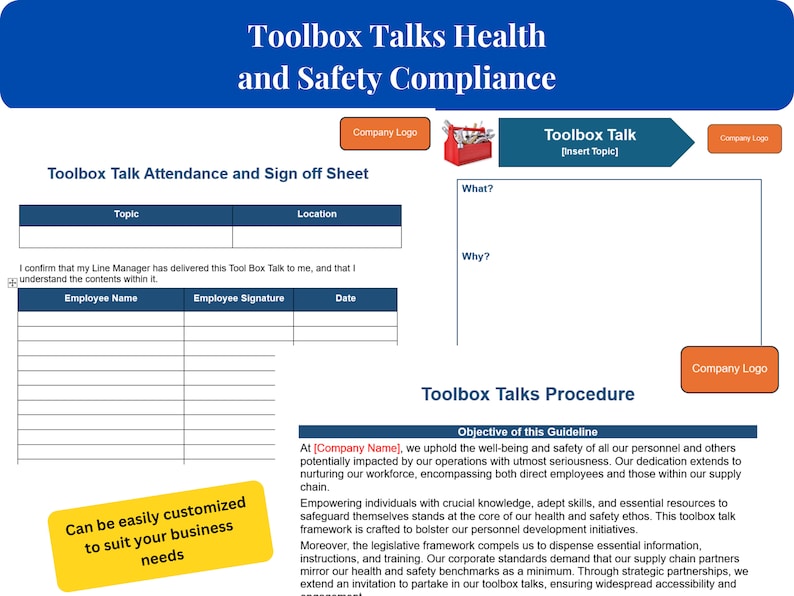
Core Components of an Effective Template
Every useful template should include these sections:
- Topic Title – Clear and specific (e.g., “Working at Height: Harness Inspection”)
- Date & Location – Critical for audit trails and incident investigations
- Attendees List – Ensures accountability and tracks participation
- Discussion Points – Bullet-form safety facts, hazards, and controls
- Real-World Example – A near-miss or case study relevant to the team
- Action Items – What workers will do differently after the talk
- Sign-Off Section – Proof of participation (not understanding)
“A good template doesn’t just record a talk — it shapes the conversation.”
Avoid one-size-fits-all formats. A template used on a construction site shouldn’t look the same as one used in a warehouse. Context matters.
Common Mistakes That Render Templates Useless
Even with a solid template, many teams still conduct ineffective toolbox talks. Here’s where they go wrong:
❌ Reading Word-for-Word Supervisors treating the template like a script kill engagement. The document should prompt discussion, not replace it.
Fix: Use bullet points, not paragraphs. Leave space for open-ended questions.
❌ Repeating the Same Topics Talking about PPE every Monday breeds complacency. Workers tune out when content isn’t relevant.
Fix: Rotate topics monthly, but adjust dynamically based on job scope (e.g., introduce ladder safety before starting roof work).
❌ No Follow-Up If nothing changes after the talk, why have it?
Fix: Assign one small action per session — “Check your lanyard attachment point before climbing” — and verify compliance later.
❌ Ignoring Worker Input Top-down safety messaging disempowers teams.
Fix: Build a “What did we miss?” section into your template. Let workers add observations.
❌ Using Digital Templates Poorly Going paperless doesn’t help if workers are squinting at a tablet in bright sunlight or can’t sign digitally.
Fix: Choose mobile-friendly formats (PDFs with fillable fields) or offline-capable apps.
When to Use a Toolbox Talk Template (And When Not To)
Templates work best in consistent, repeatable environments. But they’re not magic. Know when to rely on them — and when to go off-script.
✅ Use a Template When:
- Onboarding new crews
- Rolling out new equipment or procedures
- Addressing recurring hazards (e.g., slips, trips, falls)
- Preparing for audits or inspections
❌ Skip the Template When:
- Responding to a near-miss or incident — use a hot wash debrief instead
- Facing an unpredictable hazard (e.g., sudden weather change) — go real-time
- Talking to highly experienced teams who need nuanced discussion — switch to facilitation mode
Templates standardize communication — not thinking.
5 Real-World Toolbox Talk Templates (With Use Cases)
Here are five practical, customizable templates designed around actual job scenarios. Each fits on one page and aligns with OSHA and ANSI standards.
| Template | Best For | Key Focus |
|---|---|---|
| Hazard Recognition Drill | General construction crews | Teaching workers to spot risks before starting tasks |
| PPE Inspection & Fit Check | Manufacturing, warehousing | Proper use and maintenance of gloves, respirators, harnesses |
| Weather-Related Risks | Outdoor crews (landscaping, utilities) | Heat stress, lightning, slippery surfaces |
| Lockout/Tagout (LOTO) Brief | Maintenance teams | Energy isolation procedures |
| Task-Specific Safety Brief | Specialized work (welding, confined space) | Pre-job hazard review and controls |
Example: Task-Specific Safety Brief Template
Topic: Confined Space Entry – Tank Cleaning Date: April 5, 2024 Location: North Storage Yard, Tank B7
Key Hazards: - Low oxygen levels - Toxic fumes from residue - Limited egress
Controls in Place: - Air monitoring conducted 30 min prior - Ventilation fans running - Attendant stationed at entry point - Rescue tripod on standby
Discussion Prompt: “What would you do if your gas alarm goes off mid-entry?”
Action: Each entrant checks harness and comms before descent.
Attendees: [Signatures]
This isn’t theoretical. Two months prior, a crew in Indiana avoided poisoning because they’d reviewed this exact scenario the morning of the job.
How to Customize Templates for Your Industry
A generic template won’t cut it. Tailoring is non-negotiable.
Construction Focus on: fall protection, scaffolding, electrical safety Add: Daily equipment check reminders Format: Clipboards with carbon-copy sheets for office retention
Manufacturing Focus on: machine guarding, LOTO, chemical handling Add: Shift handover notes Format: Digital forms synced to maintenance logs
Utilities Focus on: overhead lines, trenching, arc flash Add: Weather impact notes Format: Mobile apps with GPS tagging
Warehousing Focus on: forklift safety, stacking, manual handling Add: Housekeeping checklist Format: Wall-mounted whiteboards with wipe-off templates
Pro Tip: Print templates on thermal paper with UV ink — they last longer in harsh conditions.
Integrating Templates Into Your Safety Workflow
A template is useless if it’s buried in a folder. Build it into your daily rhythm.
Step 1: Schedule in Advance Plan weekly topics every Friday. Tie them to the upcoming week’s work plan.
Step 2: Distribute Early Email templates to supervisors 24 hours ahead. Let them prepare and adapt.
Step 3: Deliver On-Site Hold the talk where the work happens. Show, don’t just tell.
Step 4: Capture & Archive Scan signed sheets or sync digital logs. Store by date and location.
Step 5: Review Monthly Audit 10% of talks. Are they relevant? Are action items followed?
This isn’t bureaucracy — it’s continuous improvement.
Free vs. Paid Toolbox Talk Template Solutions
You don’t need to build from scratch. Many pre-built solutions exist — but quality varies.
| Solution | Type | Pros | Cons |
|---|---|---|---|
| SafetyCulture (iAuditor) | App + Templates | 100+ customizable templates, mobile-friendly | Subscription cost, learning curve |
| Creative Safety Supply | Free PDFs | No cost, OSHA-aligned, printable | Static, no tracking |
| EHS Insight | Software Platform | Automated scheduling, audit trails | Enterprise pricing |
| Template.net | Downloadable Docs | Quick access, variety | Generic, outdated formats |
| SafetyTek | Industry-Specific Kits | Tailored to construction, oil & gas | Niche focus, limited flexibility |
For most small to mid-sized teams, a hybrid approach works best: start with free PDFs, then migrate to a digital platform as needs grow.
Closing: Make Your Template a Living Tool
A toolbox talks health and safety template should never be static. Revisit it quarterly. Ask workers: “Does this help you stay safe?” Revise based on feedback, incidents, and changing work conditions.
The best templates don’t just document — they drive safety behavior. They turn passive listeners into active participants. And that’s when real change happens.
Start today: pick one template, customize it for tomorrow’s job, and run a talk that actually matters.
Frequently Asked Questions
What should be included in a toolbox talk template? A complete template includes topic, date, location, attendee list, key hazards, control measures, discussion prompts, action items, and sign-off section.
Are toolbox talk templates required by OSHA? OSHA doesn’t mandate templates, but it requires documented safety training and hazard communication. Templates help meet these requirements efficiently.
How long should a toolbox talk last? Ideal duration is 10 to 15 minutes — long enough to cover key points, short enough to hold attention.
Can toolbox talks be conducted digitally? Yes. Many companies use tablets or apps for digital sign-in, photo documentation, and cloud storage. Ensure accessibility and compliance.
How often should toolbox talks be held? Weekly is standard, but frequency should match risk level. High-risk jobs may require daily talks.
Should employees be paid for attending toolbox talks? Yes. OSHA considers safety meetings as work time, and employees must be compensated.
Can one person lead all toolbox talks? While common, rotating facilitators improves engagement and develops safety leadership across teams.
FAQ
What should you look for in Toolbox Talks Health and Safety Template Guide? Focus on relevance, practical value, and how well the solution matches real user intent.
Is Toolbox Talks Health and Safety Template Guide suitable for beginners? That depends on the workflow, but a clear step-by-step approach usually makes it easier to start.
How do you compare options around Toolbox Talks Health and Safety Template Guide? Compare features, trust signals, limitations, pricing, and ease of implementation.
What mistakes should you avoid? Avoid generic choices, weak validation, and decisions based only on marketing claims.
What is the next best step? Shortlist the most relevant options, validate them quickly, and refine from real-world results.